04 / Integrated AI
Integrate AI into software, where possible.
Within the software I develop, AI can read documents, extract data, prepare drafts or answer questions based on company procedures. The most common case is a knowledge assistant: it answers by citing approved documents, respects permissions and hands over to a person when the material is not enough.
01 / When it helps
When it can help.
Procedures and documents are scattered
Useful information is scattered across folders, emails and files, and it is unclear which version to consult.
The same questions come up every day
People piece together answers that are already known and struggle to tell which source is current or authorised.
Knowledge depends on a single person
Criteria, exceptions and sensitive steps remain unstated, making them hard to explain to the rest of the team.
02 / See it working
Answer from a procedure without hiding the source.
Illustrative example · not a client case study
- People remain responsible
- Updating the procedure, deciding on the case and handling exceptions.
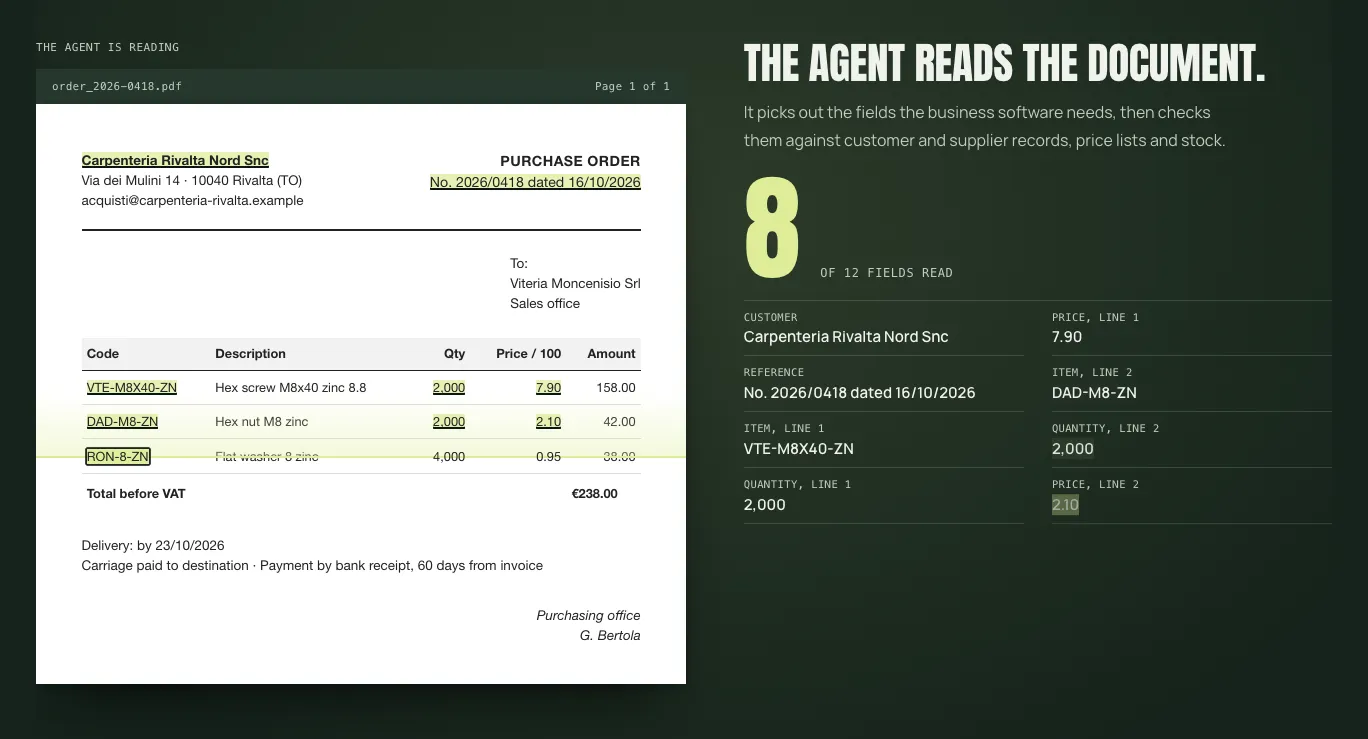
The same logic, on a different document: in the demo the AI reads an order, proposes the data and a person approves.
Question and sources What arrives
Fictional manuals and procedures, approved, with version, owner and authorised roles.
Answer with sources What it proposes
A short answer with source and version, or “Information not available”.
Owner Who checks
The procedure owner checks content, updates and permissions before use.
Conflicting sources If something is off
The tool states the limitation and indicates who to contact.
03 / How I work
From approved sources to controlled use.
I start from a limited scope and the people responsible for the content. Finding information and making decisions remain two separate things.
- 01
Define the scope
Users, permitted questions and documents that can be consulted, before building.
- 02
Prepare the sources
Versions, owners, gaps and excluded documents.
- 03
Define access and rules
Roles, permissions, citations and handover to a responsible person.
- 04
Build and test
Routine questions, edge cases, unsupported answers and updated sources.
- 05
Hand over and adopt
Materials, responsibilities and maintenance made clear to the people who use it.
04 / What can remain
Define where AI is useful.
Form and technology depend on the sources, permissions and how knowledge is consulted. I use AI only if the origin and limits of the information stay visible.
A knowledge base with a defined scope
Authorised sources, content structure, owners and update criteria within the agreed scope.
AI assistant for documents
A way to find information that shows its sources and makes clear when there is not enough information to answer.
Document reading and data extraction
AI reads emails, forms and PDFs, then presents the extracted data to a person for confirmation.
Operating rules and materials
Permissions, checks, exception handling, user instructions and responsibility for content.
05 / Questions and boundaries
Frequently asked questions.
Are the answers always correct?
They depend on the quality, completeness and currency of the authorised sources. They are not a guarantee of accuracy or compliance.
Does it replace the people who run the process?
No. It retrieves information; decisions and responsibilities stay with people.
Do all archives need to be migrated?
No. It starts from a defined scope, not from a complete company-wide document system.
What about privacy and security?
Privacy, managed security and legal interpretation remain with qualified professionals; maintenance is agreed separately.
Can an AI agent use the tool?
Yes, if the tool is ready for agents: see AI-ready software.
Where do we start?
With process analysis: where knowledge comes from, who uses it and which area to address first.
Which information is hardest to find?
For a first phone call, all you need is the sources available, who produces the information and when it is needed.